Wednesday

Make your website or blog styler by installing wibya...

Do ou want your blog to have a Facebook ‘like’ button as well as a ‘follow’ on Twitter icon? Want your readers to have access to a live chat? Also want to have applications like Google Buzz, CoolIris or Live Chat? You can choose from several such options without getting involved with the intricacies of developing!

Wibiya is a well thought out web toolbar which adds on to your blog or website while providing highly essential features for you to retain your readers.

Wibiya has various applications for you to choose from giving you the option to customize your add-on as per your need. If you are not interested in readers subscribing to your YouTube channel and instead want them to play Flash games on your website then Wibiya gives you that option.

How to get the Wibiya Toolbar:

  • Enter basic details like your name, website/blog URL, website/blog name, etc.


  • Choose the toolbar’s color theme.

Wibiya select theme Install Wibiya toolbar on your website

  • Choose the applications you want featured on the toolbar. All the applications are selected by default. Click on them to deselect them. You can edit these application settings later as well.

Wibiya select apps Install Wibiya toolbar on your website

  • Finally, choose the blogging platform that hosts your blog. In this case it was Blogger.

wibiya choose platform Install Wibiya toolbar on your website

Wibiya’s top features:

  1. Compatible with several blogging platforms including WordPress, Blogger, Typepad, Tumblr and vBulletin
  2. Option of choosing several color themes to make their widget seem more in sync with the site.
  3. Good choice of applications to choose from.
  4. Supports analytics as well.
Personally, I felt the toolbar was easy to install and use. The choice of applications is well categorized as per your requirement such as – Increase your page views, Enrich Content, Earn Money, etc

Saturday

Download all images from any webpage with a single click

Web designers always come across websites from which he takes inspiration. We also like to take some images from the website often to create something new.

Downloading all images on a particular webpage can be quite tedious. This is where I find OutWit images a great add-on with my Firefox browser.

Features of OutWit Images

  • Install OutWit Images on your Firefox browser. You can access it from an icon next to the address bar.

OutWit button Download all images from any webpage with a single click

  • You can get these images with a simple drag and drop, you can also set the size or format specification. Selected images are gathered in a basket “the catch” from which they can be saved directly onto the user’s hard disk.
  • The application provides many options for filtering, viewing and saving the images. OutWit Images is the first application of its kind, specifically designed for the collection of images.
  • Its sleek, easy-to-use interface displays the thumbnails on a black background and allows to smoothly scroll through quantities of images, making it efficient and easy.

Images taken with OutWit:

OutWit UI thumb Download all images from any webpage with a single click

Do you know about any similar tools on Firefox or Chrome. I personally find OutWit the best. You can share your view through your comments

Increasing download speeds of torrents with low seeders

This summary is not available. Please click here to view the post.

See STARWARS In CMD ( Must Try )

See the Full StarWars On Command Prompt

1) Open Command prompt

2) Type the Following Command :

telnet towel.blinkenlights.nl

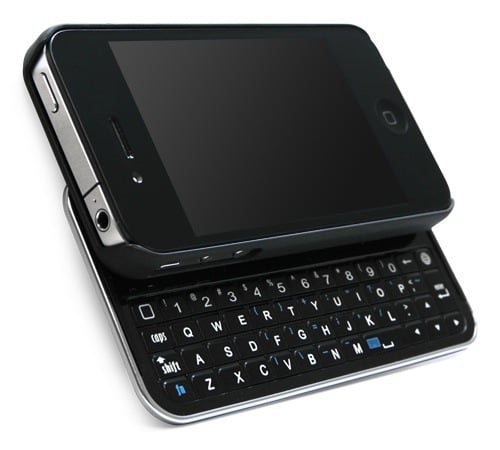
iPhone 4 gets slide-out keyboard

Are you thinking that your iPhone 4 lacks a slide-out Qwerty keyboard? Soon you’ll be able to add one.

That’s thanks to US accessories company BoxWave, which is now taking orders for Keyboard Buddy, an iPhone 4 case with a drop-down landscape-orientation Qwerty deck.

The keyboard connects to smartphone using Bluetooth, so it has its own battery on board, charged using a mini USB cable and good for 45 days’ usage, BoxWav

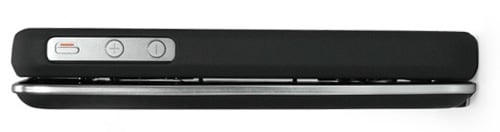
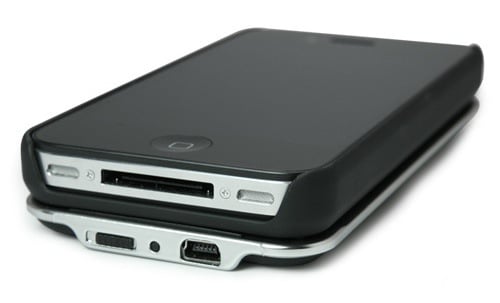
It doesn’t obscure the iPhone 4′s rear-facing camera, its controls or dock connector. The only downside: it adds a fair bit of girth to the Apple’s slim frame, though we’ve seen fatter phone.this will release on dec14th

Totally it is having awesome features i am booking my iphone4 wat abt u??

Thursday

top 5 free offline browsers and webpage downloaders..

Ever you wanted to download a whole websites and all the WebPages that are linked from them? Offline browsers can be one of the best tools for you. Offline Browser are quite unpopular these days because, most of the websites have been so much dynamic that it keeps changing and the downloaded pages may not provide up-to-date information.


However, there are certain websites, for instance, website about internet tutorials, electronic projects, food recipe, organization, etc which have static website or never updating pages. You might find the necessity of downloading these webpages to your hard drive for later review.


Here are the lists of 5 Freeware from which you can download any WebPage easily.

NetMan


No more clicking 50 times on the ‘Back’-Button of your Browser to save some pictures. No more downloading hundreds of thumbnail-pictures. KIPPING’s NetMan was first developed for users that collect pictures from the Internet..

HTTrack Website Copier


It allows you to download a World Wide Web site from the Internet to a local directory, building recursively all directories, getting HTML, images, and other files from the server to your computer. HTTrack arranges the original site’s relative link-structure. Simply open a page of the “mirrored” website in your browser, and you can browse the site from link to link, as if you were viewing it online. HTTrack can also update an existing mirrored site, and resume interrupted downloads. HTTrack is fully configurable, and has an integrated help system.

GetLeft


It is supposed to download complete Web sites. You give it an URL, and down it goes on, happily downloading every linked URL in that site.

WebReaper


WebReaper is web crawler or spider, which can work its way through a website, downloading pages, pictures and objects that it finds so that they can be viewed locally, without needing to be connected to the internet. The sites can be saved locally as a fully-browsable website which can be viewed with any browser (such as Internet Explorer, Netscape, Opera, etc), or they can be saved into the Internet Explorer cache and viewed using IE’s offline mode as if the you’d surfed the sites ‘by hand’.

BackStreet Browser


It is a free, powerful offline browser. A high-speed, multi-threading website download and viewing program. By making multiple simultaneous server requests, BackStreet Browser can quickly download entire website or part of a site including HTML, graphics, Java Applets, sound and other user definable files, and saves all the files in your hard drive, either in their native format, or as a compressed ZIP file and view offline.
With any of the above freeware, you can download large list of WebPages and view them later.

links-
netman-
Code: [Select] [nofollow]
http://www.kipping.com/netman/HTTrack Website Copier-
Code: [Select] [nofollow]
http://www.httrack.com/page/2/en/index.htmlGetLeft-
Code: [Select] [nofollow]
http://personal1.iddeo.es/andresgarci/getleft/english/download.htmlWebReaper-
Code: [Select] [nofollow]
http://www.webreaper.net/download.htmlBackStreet Browser-
Code: [Select] [nofollow]
http://www.convertjunction.com/download/bs.exe
some are written by me and some are copied

thank you

Tuesday

Access any file or folder from firefox browser

Do you find yourself searching through folder after folder to find a particular file you are working on? You may have many folders on your computer and this can make it tricky to remember exactly where the item you want is located.

Even if you know exactly where a folder is, it can be frustrating to find through the same levels of folders over and over to get to the file you want. So it becomes irritating to browse folder or file which is often needed. To access those file quickly we can create a shortcut on the browser.

image thumb2 Access file or folder from your Firefox browser

To do so we just have to simply download and install a Mozilla extension which integrates with the browser and provides quick access to the file or folder.

To get it to your browser window go in ’view menu –> toolbar –> shortcut toolbar’.

And you can see in the above image we have a toolbar just below the navigation bar.We can create a new file and folder shortcut by just clicking on the extreme left icon of the toolbar, browse the folder and we are done with a shortcut.

TOP 5 online radio applications

Here is a list of my top 5 picks for keeping you “tuned” with the hippest radio stations around the globe:

#1. Live365.com

With its own Wikipedia page, Nanocosm Inc.’s Live365 is one of the most popular online radio networks. It has more than 7000 broadcasters from over 150 countries. I am definitely impressed because it’s neatly classified with genres and has great sound quality. Must try – That 70′s Channel.

Live365 logo Top 5 Online Radio Applications

#2. SHOUTcast.com:

Every genre of music has sub-genres. The radio opens up in a separate window which makes it easy to browse through other options. While you’re there, don’t forget to try the Indian music streamers – it has Bollywood, Hindi and Tamil music! It also displays the last song played by any radio station.

ShoutcastLogo Top 5 Online Radio Applications

#3. Radiolicious.com

Radiolicious has great variety, and is not as cluttered as the others. You have to simply browse through the pages and choose what you like. You can also download a version compatible with your iPhones/iPads.

RadioliciousLogo Top 5 Online Radio Applications

#4. Last.fm

Though you have to create an account here, it doesn’t take much time. My favorite is the Red Hot Chilli Peppers Radio. You can change the skins as well but red or black are the only choices.

LastfmLogo Top 5 Online Radio Applications

#5. HypeMachine.com

It’s not exactly an online radio, but I really want you guys to know about it. icon razz Top 5 Online Radio Applications Hype Machine tracks various music related blogs and uploads the most popular and interesting works of new artists. I think it is offbeat and a pleasant break if you have an ear for new artists.

HypeMachinelogo Top 5 Online Radio Applications

The radio was invented somewhere through the 19th century but strangely hasn’t gone out of vogue as yet. To think of it, radio paved way for our iPods and Zunes, personally its my fashion statement as well (I wear a chain with an antique transistor engraving!). Hopefully, these applications will keep the ‘radio gaga‘ still going on amongst us.

Friday

Intel Core i7 vs Intel Core 2 Duo – The Difference

With the launch of the new Core i7 (Nehalem) processors by Intel, there are many doubts regarding the Difference between Intel Core i7 and Intel Core 2 Duo and Core 2 Quad processors. In this post, I will try to list all the differences and also reasons why the new Core i7 architecture is much better than the Core 2 architecture.
Intel Core i7

Codenamed: Bloomfield – Nehalem
Fabrication: 45 nm
Instruction set: X86, X86-64, MMX, SSE 4.2
Socket: LGA 1366
Bus: Quick Path Interconnect
RAM: DDR3
Chipset Support: X58
Intel Core 2 Duo
Codenamed: Conroe, Allendale, Wolfdale – Core 2
Fabrication: 65 nm / 45 nm
Instruction set: X86, X86-64, MMX, SSE 4.1
Socket: LGA 775
Bus: 1333 MHz FSB
RAM: DDR2
Chipset Support: 965, P3x, G3x, P45, X48
Explanation:
(Difference between Intel Core i7 and Core 2 Duo)

-
The Core i7 is a completely new architecture which is much faster and more efficient than the Core 2 Duo. Currently only the Core i7 920, 945 and 965 XE versions are available. Of that the Core i7 920 is available at just $284 which makes it a great buy. It offers better performance than almost all Core 2 Duo processors.

Native Quad Core, More Cache and Hyper Threading:

All the Core i7 processors are Native Quad cores (4 cores), which means that they actually have 4 cores on a single die, while the older Core 2 Duo processors like the Q6600 (2×2 = 4 cores) had two cores on a single die, and two such dies merged together. This increases the processing speed greatly. They also have 256 KB L2 cache per core and a shared 8 MB L3 cache which has proven to be much better than any cache configuration in Core 2 Duo.

It also has HyperThreading support which means that each of the 4 cores can process 2 threads simultaneously, so you get 8 virtual cores. This helps in running many applications parallely and also in gaming.

Quick Path Interconnect (QPI) and On Die Memory Controller:

The Core i7 processors sport the new Quick Path Interconnect technology which replaces the FSB (Front Side Bus) to connect the various components in a computer. QPI is much faster than FSB and hence improves the overall performance. It is even faster than AMD’s similar HyperTransport 3.0 standard.

The Core i7 have an On Die Memory Controller which means that it can access memory much faster than the Core 2 Duo processors which had an external memory controller. Intel has borrowed this feature from AMD. All the four cores, memory controller, cache are on the same die which improves the speed and performance greatly.
Intel X58 Chipset and DDR3 RAM:

The new Core i7 processors work with Intel’s newest X58 chipset motherboards – these are the best currently available and have superb features like PCI Express 2.0, Support for both AMD’s Crossfire and Nvidia’s SLI to use two graphic cards simultaneously. The combo of Intel X58 and Core i7 also runs much cooler and consumes much less power than the older Core 2 Duo processors. Also the new Core i7 and X58 combo supports only the super fast DDR3 RAM which is becoming cheaper day by day.

These are the main differences between the Intel Core 2 Duo and the Core i7 processors. AMD doesn’t seem to have a decent processor coming up which could compete with Intel’s new Core i7 – the new king. The new Core i7 processors beat every other processor when it comes to performance and are also much more power efficient. They are better for gaming and other tasks. They also overclock better than any Intel or AMD processor.

Run Commands In Windows...

You can access all these programs by going through START/RUN or Simply Click Windows Key+r

• SQL Client Configuration - cliconfg
• System Configuration Editor - sysedit
• System Configuration Utility - msconfig
• System File Checker Utility (Scan Immediately)- sfc /scannow
• System File Checker Utility (Scan Once At Next Boot)- sfc /scanonce
• System File Checker Utility (Scan On Every Boot) - sfc /scanboot
• System File Checker Utility (Return to Default Setting)- sfc /revert
• System File Checker Utility (Purge File Cache)- sfc /purgecache
• System File Checker Utility (Set Cache Size to size x)-sfc/cachesize=x
• System Information - msinfo32.
• Task Manager taskmgr
• System Properties - sysdm.cpl
• Task Manager taskmgr
• TCP Tester - tcptest
• Telnet Client - telnet
• Tweak UI (if installed) - tweakui
• User Account Management- nusrmgr.cpl
• Utility Manager - utilman
• Windows Address Book - wab
• Windows Address Book Import Utility - wabmig
• Windows Backup Utility (if installed)- ntbackup
• Windows Explorer - explorer
• Windows Firewall- firewall.cpl
• Windows Magnifier- magnify
• Windows Management Infrastructure - wmimgmt.msc
• Windows Media Player - wmplayer
• Windows Messenger - msmsgs
• Windows Picture Import Wizard (need camera connected)- wiaacmgr
• Windows System Security Tool syskey
• Windows Update Launches - wupdmgr
• Windows Version (to show which version of windows)- winver
• Windows XP Tour Wizard - tourstart
• Wordpad - write
• Password Properties - password.cpl
• Performance Monitor - perfmon.msc
• Phone and Modem Options - telephon.cpl
• Phone Dialer - dialer
• Pinball Game - pinball
• Power Configuration - powercfg.cpl
• Printers and Faxes - control printers
• Printers Folder printers
• Private Character Editor - eudcedit
• Quicktime (If Installed)- QuickTime.cpl
• Real Player (if installed)- realplay
• Regional Settings - intl.cpl
• Registry Editor - regedit
• Registry Editor - regedit32
• Remote Access Phonebook - rasphone
• Remote Desktop - mstsc
• Removable Storage - ntmsmgr.msc
• Removable Storage Operator Requests - ntmsoprq.msc
• Resultant Set of Policy (XP Prof) - rsop.msc
• Scanners and Cameras - sticpl.cpl
• Scheduled Tasks - control schedtasks
• Security Center - wscui.cpl
• Services - services.msc
• Shared Folders - fsmgmt.msc
• Shuts Down Windows - shutdown
• Sounds and Audio - mmsys.cpl
• Spider Solitare Card Game - spider
• Malicious Software Removal Tool - mrt
• Microsoft Access (if installed) - access.cpl
• Microsoft Chat - winchat
• Microsoft Excel (if installed) - excel
• Microsoft Frontpage (if installed)- frontpg
• Microsoft Movie Maker - moviemk
• Microsoft Paint - mspaint
• Microsoft Powerpoint (if installed)- powerpnt
• Microsoft Word (if installed)- winword
• Microsoft Syncronization Tool - mobsync
• Minesweeper Game - winmine
• Mouse Properties - control mouse
• Mouse Properties - main.cpl
• Nero (if installed)- nero
• Netmeeting - conf
• Network Connections - control netconnections
• Network Connections - ncpa.cpl
• Network Setup Wizard - netsetup.cpl
• Notepad - notepad
• Nview Desktop Manager (If Installed)- nvtuicpl.cpl
• Object Packager - packager
• ODBC Data Source Administrator- odbccp32.cpl
• On Screen Keyboard - osk
• Opens AC3 Filter (If Installed) - ac3filter.cpl
• Outlook Express - msimn
• Paint pbrush
• Keyboard Properties - control keyboard
• IP Configuration (Display Connection Configuration) - ipconfi/all
• IP Configuration (Display DNS Cache Contents)- ipconfig /displaydns
• IP Configuration (Delete DNS Cache Contents)- ipconfig /flushdns
• IP Configuration (Release All Connections)- ipconfig /release
• IP Configuration (Renew All Connections)- ipconfig /renew
• IP Configuration(RefreshesDHCP&Re-RegistersDNS)-ipconfig/registerdns
• IP Configuration (Display DHCP Class ID)- ipconfig/showclassid
• IP Configuration (Modifies DHCP Class ID)- ipconfig /setclassid
• Java Control Panel (If Installed)- jpicpl32.cpl
• Java Control Panel (If Installed)- javaws
• Local Security Settings - secpol.msc
• Local Users and Groups - lusrmgr.msc
• Logs You Out Of Windows - logoff.....
• Accessibility Controls - access.cpl
• Accessibility Wizard - accwiz
• Add Hardware - Wizardhdwwiz.cpl
• Add/Remove Programs - appwiz.cpl
• Administrative Tools control - admintools
• Adobe Acrobat (if installed) - acrobat
• Adobe Designer (if installed)- acrodist
• Adobe Distiller (if installed)- acrodist
• Adobe ImageReady (if installed)- imageready
• Adobe Photoshop (if installed)- photoshop
• Automatic Updates - wuaucpl.cpl
• Bluetooth Transfer Wizard fsquirt
• Calculator - calc
• Certificate Manager - certmgr.msc
• Character Map - charmap
• Check Disk Utility - chkdsk
• Clipboard Viewer - clipbrd
• Command Prompt - cmd
• Component Services - dcomcnfg
• Computer Management - compmgmt.msc
• Control Panel - control
• Date and Time Properties - timedate.cpl
• DDE Shares - ddeshare
• Device Manager - devmgmt.msc
• Direct X Control Panel (If Installed)- directx.cpl
• Direct X Troubleshooter- dxdiag
• Disk Cleanup Utility- cleanmgr
• Disk Defragment- dfrg.msc
• Disk Management- diskmgmt.msc
• Disk Partition Manager- diskpart
• Display Properties- control desktop
• Display Properties- desk.cpl
• Display Properties (w/Appearance Tab Preselected)- control color
• Dr. Watson System Troubleshooting Utility- drwtsn32
• Driver Verifier Utility- verifier
• Event Viewer- eventvwr.msc
• Files and Settings Transfer Tool- migwiz
• File Signature Verification Tool- sigverif
• Findfast- findfast.cpl
• Firefox (if installed)- firefox
• Folders Properties- control folders
• Fonts- control fonts
• Fonts Folder- fonts
• Free Cell Card Game- freecell
• Game Controllers- joy.cpl
• Group Policy Editor (XP Prof)- gpedit.msc
• Hearts Card Game- mshearts
• Help and Support- helpctr
• HyperTerminal- hypertrm
• Iexpress Wizard- iexpress
• Indexing Service- ciadv.msc
• Internet Connection Wizard- icwconn1
• Internet Explorer- iexplore
• Internet Setup Wizard- inetwiz
• Internet Properties- inetcpl.cpl